N4D Launches Edit Texture to Help Creators Precisely Customize 3D Model Textures
Edit Texture lets creators select areas of an existing textured 3D model and use prompts or reference images to refine
Press Release Disclaimer: This is a press release distributed through the XPR Media network. It has not been independently verified by our newsroom.
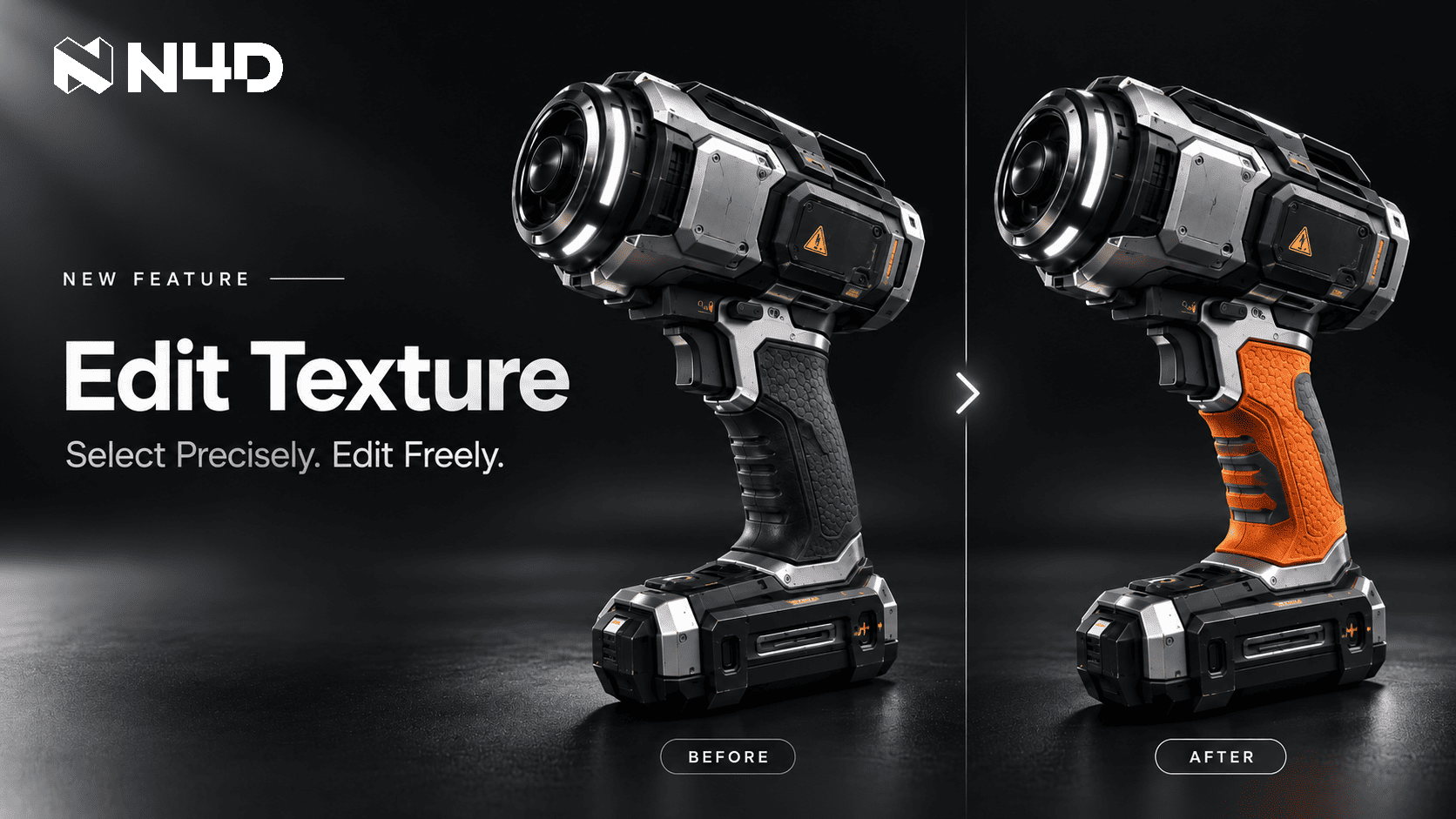

Edit Texture lets creators select areas of an existing textured 3D model and use prompts or reference images to refine colors, patterns and surface details.
NEW YORK, NY, UNITED STATES, October 22, 2026 /EINPresswire.com/ — N4D (formerly Neural4D), an AI platform for 3D content creation, has introduced Edit Texture, giving creators more precise control over the appearance of their 3D assets. The feature lets users select specific areas of an already textured model and explore different colors, patterns, and surface details through AI-powered edits, adding a targeted refinement step to the existing 3D workflow.
Targeted Texture Editing with AI
Edit Texture brings area selection and text instructions together in N4D’s 3D texture editing workflow. Creators paint over the surface they want to modify, enter a prompt describing the desired appearance, and optionally add a reference image to guide the edit. Applying the change generates a new texture version for review.
For 3D artists and independent developers, this creates a way to address a specific texture decision after reviewing a generated asset. Creators can identify the areas that need attention and request targeted texture changes without generating a new model.
Refine a Prop Handle or a Character Outfit
Edit Texture supports targeted adjustments across different 3D assets. Game artists can refine the color of a prop’s handle, while character designers can experiment with clothing patterns or fabric details using text instructions and optional reference images. These edits allow creators to focus on specific visual decisions once a textured model has been generated.
From Generation to Targeted Refinement
Creators can select Texture when generating a model in N4D, so textures are generated alongside the model. Once a textured model is ready, Edit Texture lets users refine selected surface areas and try different looks without generating a new model.
Each applied edit creates a new texture version in the history timeline. Creators can review previous results and continue editing from an earlier version without losing subsequent versions, allowing them to explore different texture refinements.
“Creators need control over the final appearance of their assets after generation. Edit Texture gives them a way to direct visual changes to a selected area through text instructions, so they can continue refining the work they have already created.”
Feihu Zhang, CEO of N4D
Availability
Edit Texture is available now through https://www.neural4d.com/studio/image-to-3d and https://www.neural4d.com/studio/text-to-3d. Users can open an already textured model and select Edit Texture in the bottom action bar of its details page.
Product: https://www.neural4d.com/studio/image-to-3d
Product Hunt: https://www.producthunt.com/products/neural4d
G2: https://www.g2.com/sellers/neural4d
About N4D
N4D develops AI tools for generating and refining 3D assets, alongside image and video generation services. Its 3D platform supports text and image inputs, model generation with textures, and model refinement workflows. N4D turns generative research into tools that help developers, designers, and creators move from an initial idea to a usable digital asset.
Media Contact
Name: N4D
Email: support@neural4d.com
Website: https://www.neural4d.com
Neural4D
N4D
Visit us on social media:
LinkedIn
Instagram
Facebook
YouTube
TikTok
X
Other
Legal Disclaimer:
EIN Presswire provides this news content “as is” without warranty of any kind. We do not accept any responsibility or liability
for the accuracy, content, images, videos, licenses, completeness, legality, or reliability of the information contained in this
article. If you have any complaints or copyright issues related to this article, kindly contact the author above.

Media gallery